The Renovation Journal That Could Save Your Project
Without a journal, you have memory against memory. With one, you have a documented record. Here is exactly what to log, how to log it, and why ten minutes a day is the cheapest leverage in your whole renovation.

"Hey, slow dowwwnnn...I never said tile was included."
That's the entire case for keeping a renovation journal, in one sentence. Without a journal, you have memory against memory; with a journal, you have a documented record. Everything in this blog is the practical version of it. I know right now in the beginning of a project everything is exciting and nobody wants to believe the worst in people. But trust me, I learned the hard way — time, frustration, and money, well, they happen. Neither I or my general contractor (I assume!) kept a journal. Here's how it plays out…
"It's week three of a renovation, something has gone sideways, and you're trying to remember exactly what your contractor told you in that first site meeting. You think he said the tile was included. He says it wasn't. You think he promised a two-week window. He says he never committed to a date. You both have your own version of the conversation, and there's nothing on paper to settle it."
This is not a contractor problem, it's a documentation problem and it's entirely preventable. Learning how to document a home renovation from day one is the cheapest, fastest piece of leverage in this whole process. It costs nothing. It takes ten minutes to set up. And it has a way of resolving disputes before they become disputes, because once a contractor knows the record exists, everyone's version of events tends to get a lot more consistent.
What's below:
- What Goes in the Journal
- The Entry-Quality Standard
- How to Actually Keep Your Journal
- How It Changes Your Own Behavior
- What the Journal Is Actually For
- Quick Reference
- FAQ
What Goes in the Journal
Five categories, kept current from the day the contract is signed. Do not start later. The early days of a project are when the most important decisions get made, and they're almost always made verbally.
- The contract. A copy goes in immediately, tagged and dated — not filed away in an email thread somewhere. This is the document everything else gets measured against. If it changes through a signed change order, that change order goes in beside it.
- The timeline. Write down the dates that matter: when work was supposed to start, when it actually started, when each phase was scheduled to finish, and what reason you were given for any delay. Dates are evidence. Impressions aren't.
- Photographs. Before, during, and after each phase. The before photo matters as much as the after — it establishes what was there before anyone touched it, which is exactly what you need if something gets damaged along the way. Timestamp them and save them somewhere other than your camera roll.
- Invoices and payments. Every invoice and every payment, logged beside each other — the amount, the date, what it claimed to cover, how you paid. This protects you in both directions: if a contractor later claims a payment wasn't received, or claims work was done that you never actually paid for.
- Change requests. The moment scope changes — materials swapped, work added, something dropped — it goes in the journal the same day, even if it started as a verbal conversation. What was proposed, what was agreed, the dollar amount, and whether it was ever actually signed.
The Entry-Quality Standard
Not every note is actually a record. The standard is simple: specific enough to settle an argument later, not just descriptive enough to remember the gist.
Compare these two entries:
- "He always seemed to be behind."
- "Work was scheduled to begin June 3rd. The contractor arrived on June 11th, citing a prior job running long. No revised schedule was provided in writing until June 14th."
Only one of those is evidence.
The bar for a same-day entry is lower than you'd think — about ninety seconds: "Contractor called at 2 PM, said the subfloor will need replacing, estimated $800 additional, no written change order yet." That's it. That's a real entry.
One line worth remembering on its own: unsigned change requests are not change orders. Anything less than a signed, written agreement is just a conversation — and conversations don't pay contractors or protect homeowners.
How to Actually Keep Your Journal
There's no correct format. There's only a format you'll actually use.
The key overall direction here is however you do it, make sure you can easily pull together and package printouts and documentation for a judge for a court hearing. Sounds extreme, but keeping this in mind will keep you prepared at a moment's notice for any situation. Like a tile dispute, onsite, with your contractor!
Some people use a physical three-ring binder with tabbed sections. (My wife, Tabitha, loves three ring binders!!) Some keep a dedicated folder in their email. Some use a notes app, updated the same evening after any conversation with the contractor.
Some of the best and easiest apps
- Microsoft OneNote for a free note-taking app
- Apple Notes for Apple users
- Google Keep for Google power users
- Notion for collaboration
- Obsidian for power note-takers
- Joplin for an Evernote alternative
- Evernote for a redemption arc
Some use a shared document (Google Docs) so a spouse or partner can also access.
The format matters less than two things:
- Consistency
- Immediacy
Every communication gets logged the day it happens. Every payment gets logged the day it's made. A journal you update once a week from memory isn't a record — it's a reconstruction.
Use pics from your phone liberally!
In most U.S. states, small claims judges see both sides regularly, and a homeowner with a clear, timestamped record (phone pics) carries a lot more weight than one who can only speak from memory. Here's the easy way to get the time stamp from your phone…
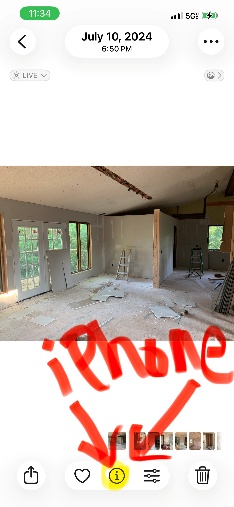
Go to your phone pics library or renovation folder (pictured is my iPhone pic from our renovation). On the bottom navigation find the "Information" icon (a lower case "i" in a circle). Tap it and it takes you to the timestamp information.
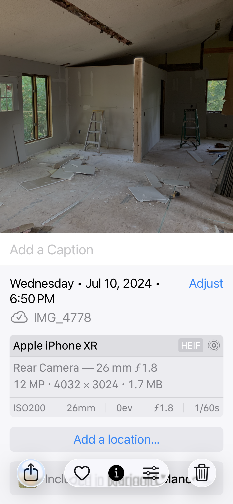
For your journal documentation, just take a screenshot and save it into your renovation folder.
There are also a variety of specialized apps for your phone, Apple or Android, in the app store.
How It Changes Your Own Behavior
Keeping a rigorous journal does something most homeowners don't expect: it changes how you show up on the job site.
When you're photographing each phase, writing a note after every conversation, and checking payments against a documented schedule, you're paying a different kind of attention. Problems that would otherwise slide past you get caught earlier. A problem identified in week two is a conversation. A problem identified in week six is a dispute.
It also runs a free background check on your contractor. The kind of contractor who pushes back when you mention you're keeping a project journal is telling you something worth knowing — showing you something about how this project is going to go, before the project shows it to you itself.
What the Journal Is Actually For
Here's what it's actually for: it's what you bring to the table the moment a dispute starts.
If you contact a contractor's licensing board, you bring the journal. If you file a complaint with the Better Business Bureau, you bring the journal. If it ends up in small claims court, you bring the journal. It's the organized summary of what happened, in what order, and at whose direction.
If you're in Ontario or British Columbia
This matters even more directly: consumer protection offices that handle contractor complaints specifically look for documentation of the original scope, the agreed price, and the actual work performed.
Before filing, you can verify current complaint procedures at
Without a journal, you have memory against memory. With one, you have a documented record. That asymmetry matters — and it's the whole reason any of this is worth ten minutes a day.
Quick Reference
- Log: contract, timeline, photos, invoices/payments, change requests
- Standard: date, what happened, what was said — specific enough to settle a disagreement, not just a vibe
- Keep it in: whatever you'll actually update the same day — binder, folder, notes app, shared doc
- Red flag: any resistance to you keeping one
FAQ
What should be in a renovation journal?
The contract, the timeline, photographs, invoices and payments, and change requests — see What Goes in the Journal above.
Do I need a special app to keep one?
No. A binder, a notes app, or a shared document all work. What matters is logging entries the same day, not the tool you use.
Can a renovation journal actually be used in a dispute?
Yes. It's the documentation homeowners bring to a licensing board complaint, a BBB complaint, or small claims court.
When should I start it?
The day the contract is signed. The first entry is the contract itself.
How much detail does each entry actually need?
Enough to settle a disagreement later — see The Entry-Quality Standard above.

Blog by Clinton Treece, author of "The 16 Things I Wish I'd Known Before I Hired A Contractor"